
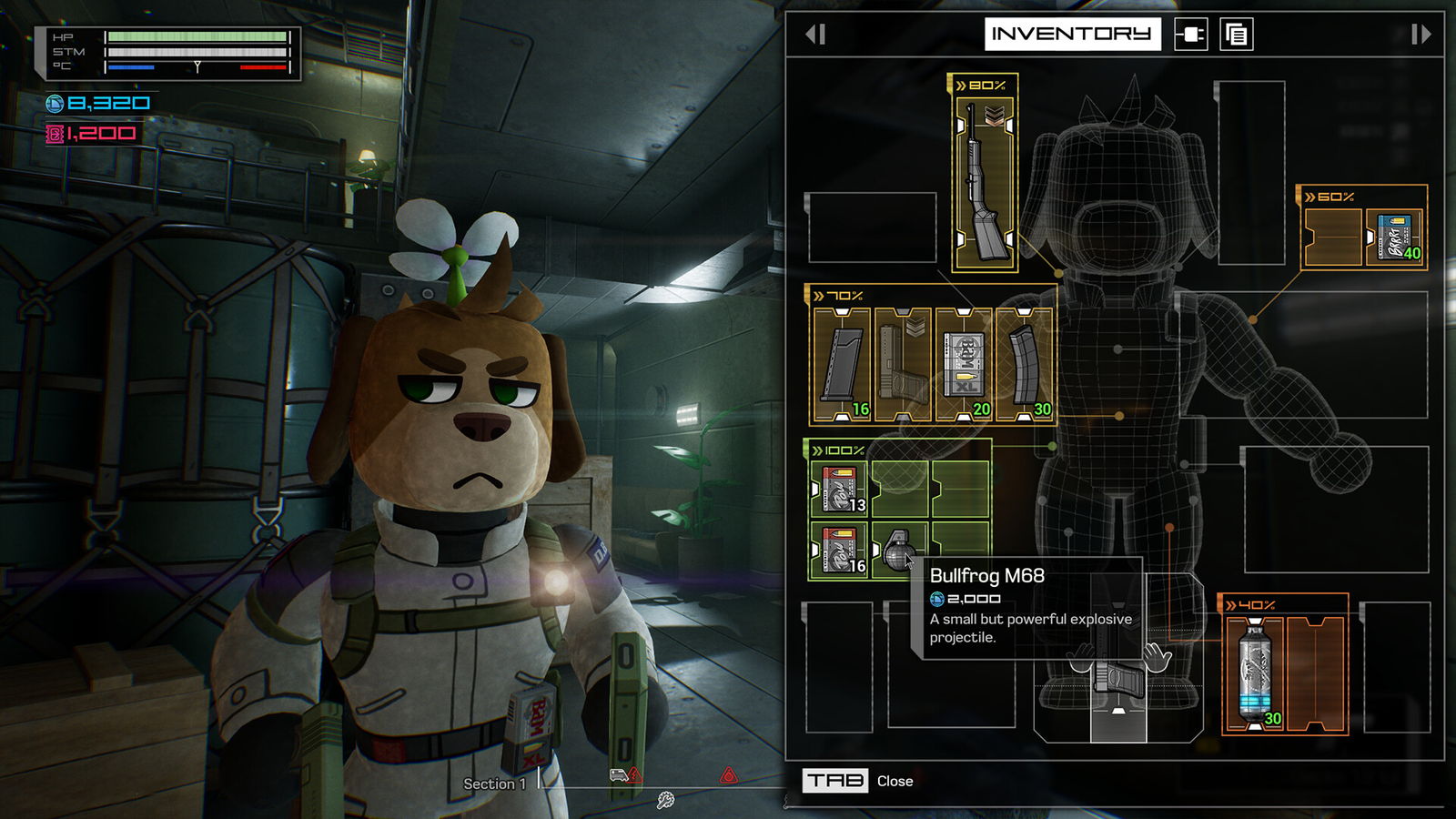
Quick answer: A gun, an inserted magazine, spare magazines and loose rounds are separate pieces of your loadout. Equip the gun, bind a useful quick slot, check that a filled magazine is inserted, then replenish the magazine from your spare rounds when safe. Body placement affects retrieval speed; empty-looking space may be the wrong type of slot.
Why the inventory feels different
Most shooters collapse ammunition into one number and let the reload key handle the rest. Fright Train deliberately separates storage, body placement and the act of filling a magazine. The developer explains that large and medium objects appear physically on Doug and that where you store an item affects how fast you can fetch it. A magazine on the chest can be reached sooner than one on the lower back. Official inventory description.
The practical result: rearrange equipment between fights. A perfectly full backpack does not help if the rounds you need are not in a usable magazine when the storm hits.
Gun won’t fire: check in this order
- Hand slot: open the Paw Pad and confirm the weapon is equipped, not only present in general inventory. In full-version footage, the tutorial uses double-click to equip a weapon.
- Quick slot: assign the weapon to one of the available numbered shortcuts, then use that shortcut to draw it. The quick slot is convenient, not an ammo source.
- Inserted magazine: open the weapon’s reload interaction and inspect the currently selected magazine. A gun can be carried without a filled magazine ready.
- Magazine contents: distinguish the bullets inside the magazine from loose rounds or boxes. Fill the magazine from your spare ammunition before expecting the next reload to work.
- Movement and threat: close the menu and verify the weapon is drawn before moving back into an active encounter. If switching equipment interrupts your action, return to cover and reset deliberately rather than mashing inputs.
This order is built from the full-version tutorial demonstration at Waddles 2:09–3:00. Prompts may differ by controller and bindings.
Two reload actions, not one
| Action | What it does | Best time |
|---|---|---|
| Insert magazine | Puts an existing magazine into your gun | When the gun runs dry in or between fights |
| Fill magazine | Moves rounds from ammunition supply into a magazine | At a safe moment before waves begin |
The official description explicitly distinguishes these actions. Buying ammunition is not evidence that a magazine has been filled. If an ammo purchase leaves you unable to shoot, check the magazine state before assuming the purchase failed. If an item’s tooltip is unclear, verify its ammo compatibility in the game’s current item view instead of buying every package in the vending machine.
Slot size is a rule, not decoration
The full release tutorial distinguishes several item-slot types. A slot that looks blank might still reject a large or medium item because it is not compatible. Try moving objects into the corresponding slot type; there is no reason to believe all empty rectangles are interchangeable. The first-run footage also shows quick-slot assignment and on-body equipping as separate operations.
For speed, prioritize the objects you reach for under pressure: gun, a suitable magazine, heat and emergency healing. Put objects used between fights where quick retrieval matters less. This is a tactical layout suggestion; there is no published universal fastest-build table for every item combination.
Common inventory failure cases
“I bought ammo but can’t reload.” Check whether it is loose rounds versus a prefilled compatible magazine. Then inspect which magazine is actually selected. A specific in-game ammo type, price or round count must come from your current weapon UI rather than an old demo screenshot.
“I can see free cells but the item won’t fit.” Look at the slot category and item’s physical size. Reorganizing within the same incompatible slot type will not solve it.
“My weapon disappeared after switching to healing.” At least one Steam player reported a lost gun after a quick swap; that is a report, not a confirmed reproducible cause. First inspect hand, backpack, dropped items and quick slots. If truly absent, report the version, exact swap sequence and a clip to the developer. Steam community report.
“My quick keys don’t suit my keyboard.” Another player asked for easier non-English keyboard bindings. Inspect the release game’s binding menu and current patch notes before relying on an online configuration from a demo build.
Pre-storm loadout audit
Check each state separately: gun in hand or an accessible shortcut; usable magazine inserted; replacement magazine available; enough spare rounds to refill; healing within reach; and heat pad accessible. You do not need a mathematically “optimal” layout — you need to avoid discovering that your only ammunition is loose while enemies are already entering the carriage.
Sources: WildArts official press kit — inventory mechanics, Waddles full-release tutorial, Steam game discussion.
Watch the real game
FULL RELEASESource: Waddles. The video belongs to its creator and loads only when you choose to play.