Quick answer: Watch car condition in the HUD and fix damage at maintenance terminals before a breakdown. A stopped train can lose lighting and heating, turning an ordinary repair into an exposure risk. When the storm warning appears, get inside, prepare ammunition and heating, secure breaches and survive the wave; once the exit opens, keep moving.
Read the signals before you panic
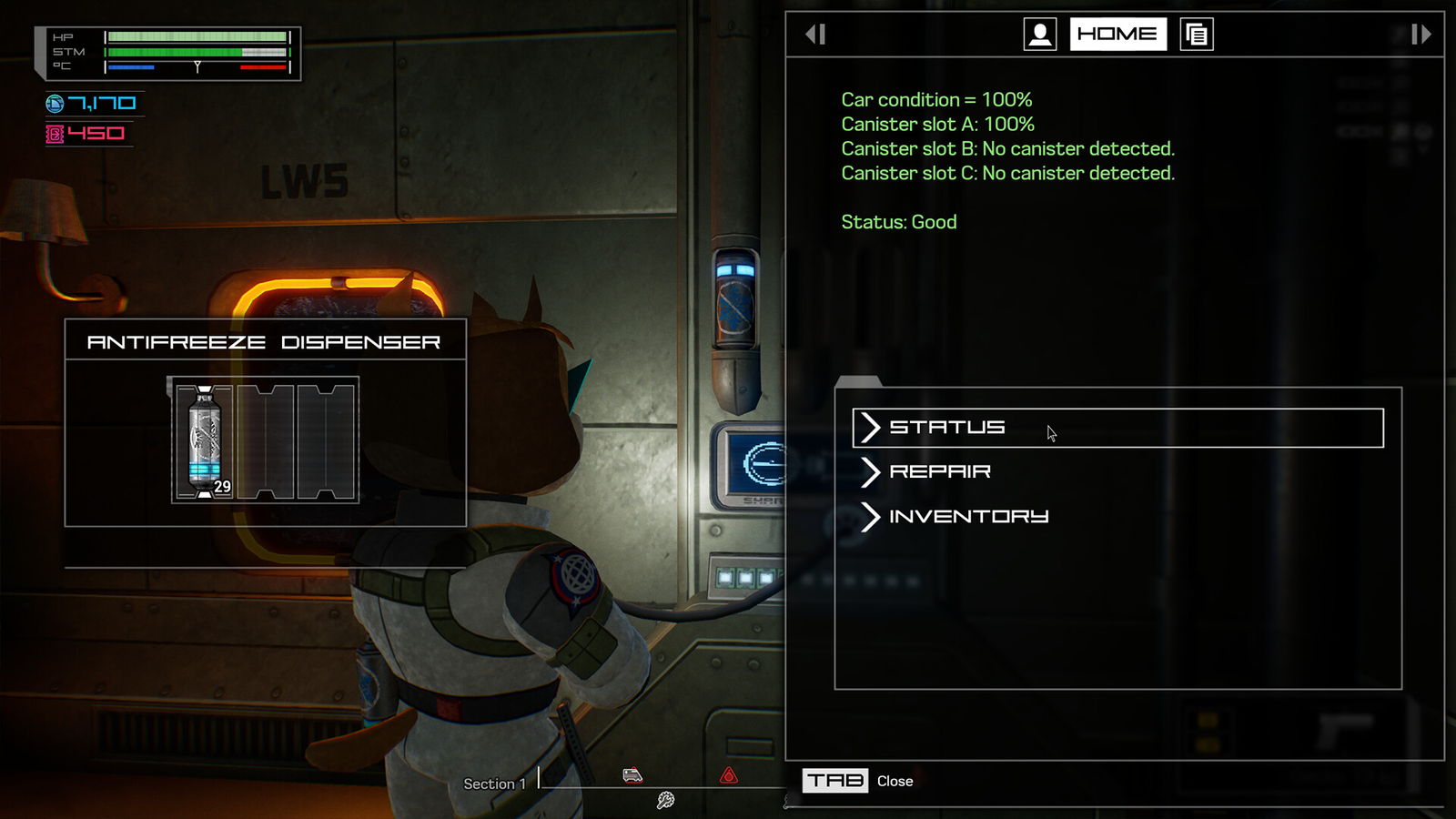
There are multiple threats on screen, and solving one does not automatically solve the others. Car condition describes whether a section can keep operating. Temperature describes whether Doug is surviving the environment. Storm warnings signal incoming hostiles. Distance or section progress tells you how near you are to a transition. The official press kit confirms that train repair, storms, a chasing threat and extraction are fundamental to progression. Developer gameplay outline.
At least one current-release full-playthrough shows a train car degrading and the characters explaining that a breakdown disables power and heating while an outside terminal becomes available. The result is a cascading problem: waiting to repair creates an even more dangerous repair. Zhain’s full-release story sequence around 9:50.
Repair while the train is still running
- Check the car’s condition when you enter a new section; do not assume every car is healthy because the previous one was.
- Locate the maintenance terminal associated with the current car. Read its actual status before consuming limited maintenance supplies.
- Begin repairs early if the displayed condition is deteriorating, rather than pushing to failure as a routine strategy.
- Check whether your route and survival supplies are prepared. A repair prevents one emergency; it does not remove the approaching storm or worm timer.
- Recheck condition after hostile waves, because the developer’s description says keeping the train running is a continuing responsibility.
Early demo tutorials also describe antifreeze canisters as a way to shield train systems. Since the developer says the launch version changed mechanics and items, use the current in-game terminal labels for the exact antifreeze interaction; do not assume an old slot count, repair price or refill value still applies.
If the train stops
The story dialogue explains the chain: a seriously damaged car can stop the station, power-saving disables its heating, and an exterior maintenance station can become accessible. Move promptly to the marked repair point, interact with the terminal and follow the current on-screen objective to restart the car. Do not wander outside searching for optional crates while your temperature is falling.
Make a small return plan before stepping out: where is the door, what restores movement, and do you have a heat pad? If you are already critically cold, stabilize if you can before committing to extended exposure. The game does not publish a universal safe number of outside seconds that applies to all difficulty choices and character states, so this guide does not invent one.
Storm preparation: a safe-room routine
| Before the warning peaks | During the wave | After the wave |
|---|---|---|
| Check car condition and an enclosed area | Stay mindful of incoming windows and vents | Check whether the security exit has opened |
| Insert a loaded magazine | Protect an exposed flank instead of chasing every sound | Inspect health, loaded ammo and car status |
| Keep heat and healing accessible | Close accessible breaches when the temperature drops | Move toward the next objective while there is time |
The tutorial describes enemies entering through windows and vents and links open windows to cold exposure. In a full-release run, the automated warnings also call attention to breached windows and falling car temperature. Full-version footage showing breaches at ~1:02. Closing every opening may cost resources; fix the breaches endangering your actual position rather than claiming a fixed universal order.
The worm and the section boundary
The trailing entity is a deadline. In the release story, Widget describes a fast signature following the train and a high-security door to the next section. Once the distance tracker runs out and the exit is open, cross to the next section promptly. A player has reported getting caught near a checkpoint; without a reproducible patch history, this is reason to leave margin, not to declare the checkpoint universally broken. Story dialogue ~12:15 · Player discussion.
Which problem killed you?
- Cold while moving: check heat pad use, breached windows and your exposure near openings.
- Cold after a breakdown: the repair sequence is likely the priority; find the currently active maintenance point and restore movement.
- Overwhelmed during a storm: prepare a loaded magazine in advance and use an enclosed position with readable approaches.
- Caught while looting: stop treating the final stretch of the progress bar as spare scavenging time; prioritize the exit.
- Car repeatedly failing: monitor condition between storms instead of treating the terminal as a one-time tutorial objective.
This guide covers the system, not a fabricated exact repair recipe. For a first-run plan see the beginner guide; for precise weapon preparation, the inventory guide resolves ammo versus magazine confusion.
Sources: WildArts press kit, full-release story video, full-release gameplay and maintenance overview.
Watch the real game
FULL RELEASESource: Cdubya719. The video belongs to its creator and loads only when you choose to play.